
What is Error Monitoring?
Error monitoring is the process of tracking, capturing, and analyzing errors and exceptions that occur within an application, both in development and production environments. The goal of error monitoring is to catch issues as they happen, gather detailed context about them, and notify developers so they can fix problems before users are negatively impacted.
Why is Error Monitoring Useful?
Error monitoring is essential for delivering a stable and bug-free user experience. It helps developers:
- Identify issues early: Catch errors before they reach the end-users, reducing downtime.
- Get detailed error context: Understand where and why the issue occurred (such as stack traces and user environments).
- Improve debugging: Quickly reproduce the issue using the data provided.
- Track trends: Identify recurring errors or performance issues over time.
Without error monitoring, errors may go unnoticed until users report them, potentially damaging user experience and app reputation.
How Many Different Tools Are Available for Error Monitoring?
Several tools are available to help monitor and track errors, such as:
- Sentry: A popular choice for real-time error tracking and performance monitoring.
- LogRocket: Combines logging, error tracking, and session replay.
- Raygun: Monitors both errors and application performance.
- New Relic: A comprehensive monitoring tool for infrastructure and application performance.
- Datadog: Offers both infrastructure and error monitoring in real-time.
In this blog, we will focus on Sentry, a powerful tool for error monitoring and performance tracking in React.js applications.
Sentry Setup in a React.js Project
Using Vite to Run React Project
In this tutorial, we will integrate Sentry with a React.js project created using Vite, a fast build tool for frontend frameworks.
Step 1: Install Sentry
To begin, you’ll need to install the Sentry SDK for React. Open your terminal inside your project directory and run the following command:
npm install @sentry/react --saveStep 2: Create a Sentry Account and Project
- Visit Sentry’s website and register for a new account (if you don’t have one already).
- Once signed in, create a new project.
a. Sentry will provide you with a DSN (Data Source Name) and instructions for initializing the Sentry SDK in your app.
Step 3: Initialize Sentry in main.tsx
Now, head over to your main.tsx (or index.tsx if you’re using TypeScript) file. Copy the code provided by Sentry and paste it into the top of the file.
Here’s an example of how the initialization code should look:
import * as Sentry from "@sentry/react";

Sentry.init({
  dsn: "https://df1f2....8",
  integrations: [
    Sentry.browserTracingIntegration(),
    Sentry.replayIntegration(),
  ],
  tracesSampleRate: 1.0, // Capture 100% of the transactions
  tracePropagationTargets: ["localhost", /^https:\/\/yourserver\.io\/api/],
  replaysSessionSampleRate: 0.1, // Sample rate at 10%, adjust for production
  replaysOnErrorSampleRate: 1.0, // Sample at 100% when errors occur
});
Step 4: Test Sentry Integration
To verify that Sentry is working, you can manually trigger an error in your app:
function TestError() {
  throw new Error("Test error for Sentry");
}

function App() {
  return <TestError />;
}
Run your project:
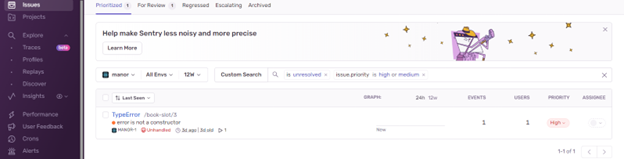
npm run devNow, visit your app in the browser, and the error should be captured in Sentry’s dashboard.
Step 5: View Errors in Sentry Dashboard
Once the error is triggered, head to your Sentry dashboard. You’ll see detailed reports including:
- Stack trace: The exact lines of code where the error occurred.
- Environment data: Information about the user’s browser, operating system, and more.
- Session replay: A video-like replay of the user’s actions leading up to the error.