

In today’s digital landscape, incorporating AI capabilities into your applications has become essential for enhancing user experience and streamlining processes. One of the most powerful tools available is OpenAI’s ChatGPT API. In this blog post, we’ll guide you through the steps to integrate the ChatGPT API into a Laravel 11 application, enabling you to harness the power of AI in your projects.
What is ChatGPT/OpenAI?
ChatGPT is a smart computer program made by OpenAI. It can understand and write text like a human. You can chat with it, ask questions, or get help with writing. It’s like having a conversation with a very knowledgeable robot. People use it for fun, learning, and even work. OpenAI is the company that created ChatGPT and other advanced technology to help make computers more useful and helpful for everyone.
In this example, we will use the openai-php/laravel Composer package to access the OpenAI API. We will create a simple form where the user can enter their title or idea. Then, we will call the ChatGPT API to get a list of domain names based on that idea. Essentially, we will make a simple page where the user enters a title, and ChatGPT helps suggest domain names for it.
Let’s now proceed to the step-by-step example of integrating OpenAI API in Laravel 11.
Step for Laravel 11 Integrate ChatGPT / OpenAI API Example
- Step 1: Install Laravel
- Step 2: Install openai-php/laravel Package
- Step 3: Create OpenAI Account
- Step 4: Create Route
- Step 5: Create Controller
- Step 6: Create Blade File
- Run the Laravel App
Step 1: Install Laravel
To begin, we must obtain the latest version of the Laravel application by executing the command stated below. Open your terminal or command prompt and enter the given command.
composer create-project laravel/laravel example-appStep 2: Install openai-php/laravel Package
In this step, we need to install openai-php/laravel composer package to use OpenAI API. so, let’s run below command:
composer require openai-php/laravelNow, we will publish configuration file using the following command:
php artisan vendor:publish --provider="OpenAI\Laravel\ServiceProvider"Step 3: Create OpenAI Account
First you need to create Account on OpenAI website.
1. Go to https://platform.openai.com/ you can register there you will get free access $18 credit for next three months.
2. After that go to https://platform.openai.com/account/api-keys and generate the API token.
You can follow the below screenshots:
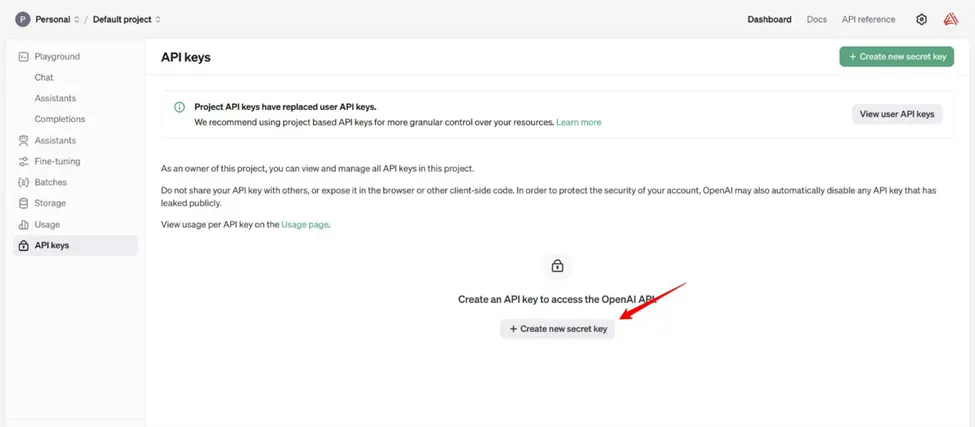
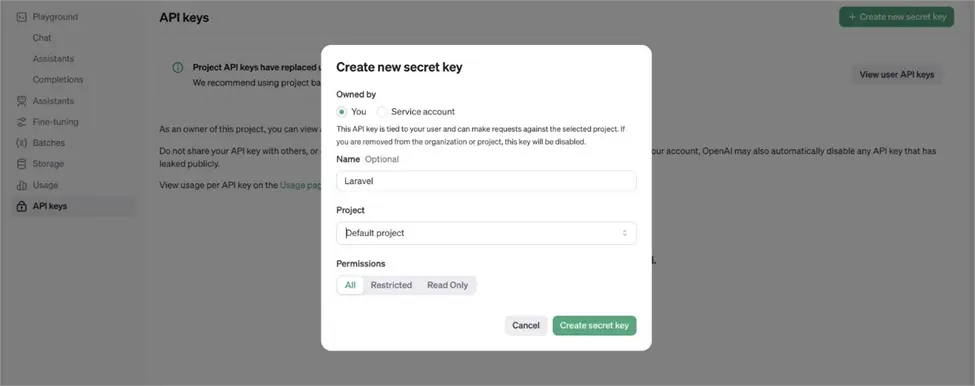
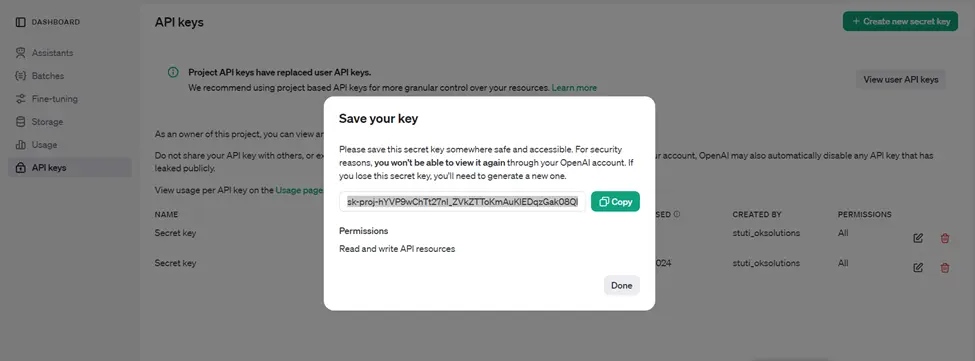
Integrating ChatGPT API with Laravel 11 interface example:
.env
OPENAI_API_KEY=api_key...Step 4: Create Route
now we will create one route for calling our example, so let’s add new route to web.php file as below:
routes/web.php
<?php
use Illuminate\Support\Facades\Route;
use App\Http\Controllers\ChatGPTController;

Route::get('/chat-gpt', [ChatGPTController::class, 'index'])->name('chat-gpt.index');
Step 5: Create Controller
In this step, we will create ChatGPTController and write payment logic, so let’s add new route to web.php file as below:
App/Http/Controllers/ChatGPTController.php
<?php
namespace App\Http\Controllers;
use Illuminate\Http\Request;
use Illuminate\Support\Arr;
use OpenAI\Laravel\Facades\OpenAI;
class ChatGPTController extends Controller
{
/**
* Write code on Method
*
* @return response()
*/
public function index(Request $request)
{
$result = '';
if ($request->filled('title')) {
$messages = [
['role' => 'user', 'content' => 'suggest me 5 domain names from "'.$request->title.'" topic. simply give me domain names list with 1. 2. 3. 4. 5. '],
];
$result = OpenAI::chat()->create([
'model' => 'gpt-3.5-turbo',
'messages' => $messages,
]);
$result = Arr::get($result, 'choices.0.message')['content'] ?? '';
}
return view('chatGPT', compact('result'));
}
}
Step 6: Create Blade File
here, we need to create chatGPT.blade.php file and update the following code on it.
resources/views/auth/chatGPT.blade.php
<!DOCTYPE html>
<html>
<head>
<title>Laravel 11 Integrate Chat GPT API Example</title>
<link href="https://cdn.jsdelivr.net/npm/bootstrap@5.0.2/dist/css/bootstrap.min.css" rel="stylesheet" crossorigin="anonymous">
</head>
<body>
<div class="container">
<div class="card mt-5">
<h3 class="card-header p-3">Laravel 11 Integrate Chat GPT API Example</h3>
<div class="card-body"> <form method="GET" action="{{ route('chat-gpt.index') }}">
<div class="form-group">
<label><strong>Give me your title, I will provide you domains list.</strong></label>
<input type="text" name="title" class="form-control" />
</div>
<div class="form-group mt-2">
<button type="submit" class="btn btn-success">Submit</button>
</div>
</form>
@if(!empty($result))
<div class="mt-5">
<strong>Result:</strong><br/>
{!! nl2br($result) !!}
</div>
@endif
</div>
</div>
</div>
</body>
</html>
Run Laravel App:
All the required steps have been done, now you have to type the given below command and hit enter to run the Laravel app:
php artisan serveNow, go to your web browser, type the given URL and view the app output:
